A city in SimCity BuildIt can look impressive on the map and still quietly underperform if the layout was never actually planned. This guide breaks down SimCity BuildIt layout strategy, how to design zones that genuinely boost population, and why happiness collapses in cities that grow too fast without the right infrastructure underneath. This game has 4.14 stars, 100M+ downloads.
SimCity BuildIt sits firmly in the city-building simulation category, and unlike games where aesthetics are the main goal, layout here has direct mechanical consequences. A poorly planned road grid or an overcrowded residential zone does not just look messy. It actively caps how large and happy your city can become.
Why Layout Decisions Compound Over Time
Early mistakes in SimCity BuildIt rarely feel like a big deal at first. A slightly inefficient road grid or a residential zone placed too close to industrial buildings seems manageable when the city is small. The problem is that these small inefficiencies compound as the city grows, eventually forcing a much more painful rebuild later.
It is similar to laying the foundation of a house without checking it is level. The tilt is barely noticeable at first, but every floor built on top of it makes the problem harder and more expensive to fix. Getting the base layout right early saves enormous effort down the road.
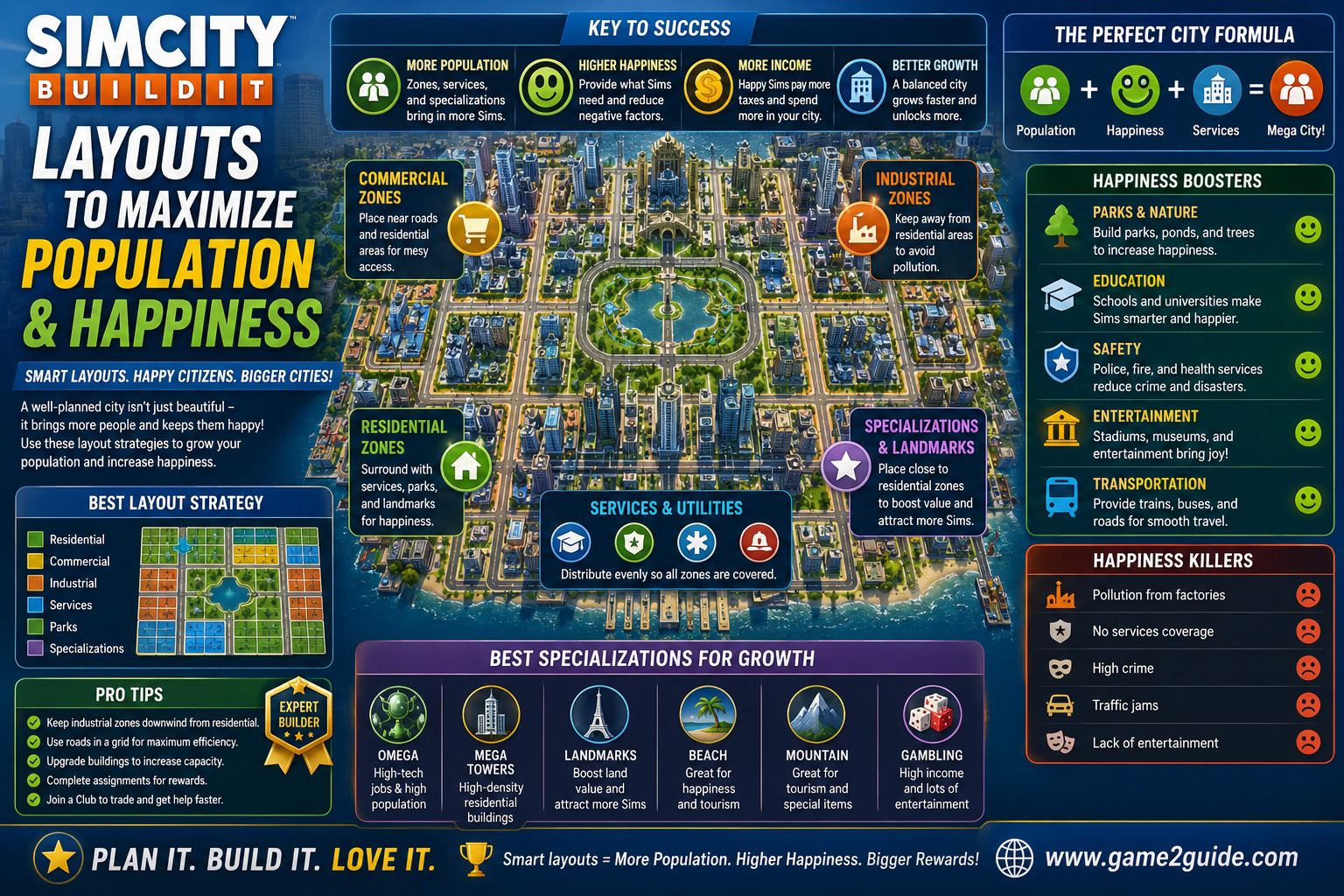
The Core Zones Every City Needs
Before diving into layout specifics, it helps to keep the fundamental zone types in mind:
- Residential zones — population growth and tax income
- Commercial zones — jobs and additional tax revenue
- Industrial zones — raw materials for production chains
- Specialized zones — parks, services, and utilities that support happiness
- Transport infrastructure — roads and later transit options connecting everything together
Balancing these zones deliberately, rather than expanding whichever one feels exciting at the moment, is the real foundation of a well-run city.
Building an Efficient Road Grid
Roads in SimCity BuildIt are not just connectors. They directly affect how buildings can be placed and how efficiently your city space gets used. A grid-based road system, rather than winding organic streets, generally allows for tighter, more efficient zoning.
A Simple Road Planning Approach
- Lay out a basic grid early, even before zoning every block
- Leave slightly wider gaps for future upgrades like avenues or transit lines
- Avoid dead-end streets where possible, since they waste buildable space
- Connect residential zones to commercial and service buildings efficiently, not just industrial areas
- Revisit the grid periodically as new road types unlock, rather than assuming the original layout stays optimal forever
A little extra planning here prevents the frustrating rebuilds that come from realizing a road grid cannot support later expansion.
Separating Residential From Industrial Pollution
One of the more common mistakes in SimCity BuildIt layout is placing residential zones too close to industrial buildings. Pollution from industry directly lowers nearby land value and happiness, which quietly caps how much population those residential zones can actually support.
- Keep a buffer zone between industrial areas and residential neighborhoods
- Use parks or specialized zones as a barrier rather than leaving empty space
- Upgrade industrial buildings to reduce pollution output once available
- Relocate persistently low-value residential zones if they sit too close to pollution sources
Balancing Population Growth With Services
Population growth without matching services quickly turns into a happiness problem. A related area worth studying alongside layout planning is the specific service radius of buildings like police stations, hospitals, and schools, since placing these strategically covers far more of the city than scattering them randomly.
- Place service buildings centrally within the neighborhoods they serve
- Check radius coverage before assuming a service building is helping a distant zone
- Upgrade key services rather than building excess low-level ones
- Prioritize parks near dense residential clusters, since they boost happiness efficiently in tight spaces
Designing for Long-Term Expansion
A city that looks great at a smaller size can become a maze once it needs to expand. Planning wider roads early, leaving buffer space around specialized zones, and avoiding tightly packed clusters with no room to grow all pay off significantly once your population climbs into higher tiers.
- Reserve space near residential clusters for future parks or services
- Avoid maxing out every buildable tile immediately, since flexibility matters more early on
- Plan for future transit options even before they unlock
- Revisit older neighborhoods periodically rather than assuming early zones stay optimal forever
Common Layout Mistakes That Cap City Growth
A handful of habits consistently show up in cities that plateau earlier than they should:
- Placing residential zones too close to industrial pollution
- Building winding, inefficient road grids instead of a clean layout
- Scattering service buildings randomly instead of checking coverage radius
- Maxing out every tile immediately, leaving no room for future upgrades
- Ignoring happiness-boosting specialized zones in favor of pure residential expansion
Final Thoughts
A thriving city in SimCity BuildIt comes down to deliberate zoning, an efficient road grid, and keeping pollution well away from residential population centers. Plan ahead rather than reacting to growth as it happens, and both population and happiness climb steadily instead of stalling out the moment your city starts to scale.
Frequently Asked Questions
What is the best road layout for SimCity BuildIt?
A clean grid system generally outperforms winding streets, since it allows tighter, more efficient zoning and leaves room for future road upgrades like avenues and transit lines.
How do I stop pollution from hurting my population growth?
Keep a buffer zone, ideally filled with parks or specialized zones, between industrial buildings and residential neighborhoods to protect land value and happiness.
Why is my city population stuck even though I have empty land?
Often this comes down to insufficient services or happiness-boosting zones nearby, rather than a lack of buildable space. Check service radius coverage before expanding further.
Should I max out every tile as soon as possible?
No. Leaving some flexible space for future parks, services, or road upgrades pays off significantly as your city grows into higher population tiers.
About the Author